
Answer Capsule
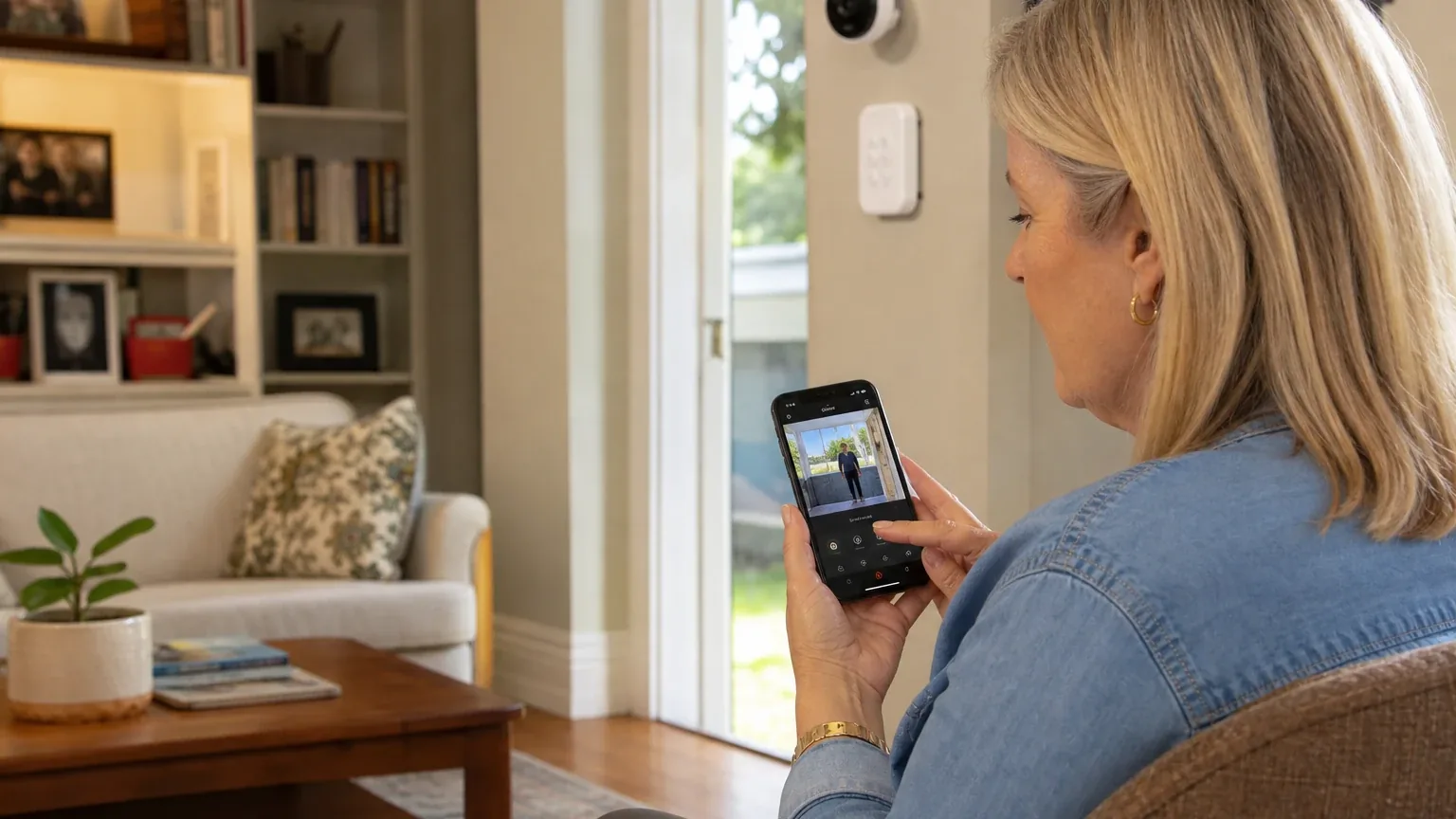
Vivint is a good, but not strong, fit for Remote Caregiver Visibility & Alerts. Four of the seven platforms in this study named Vivint during the ranking stage, and its strongest advantage is permissioned multi-user app access combined with integrated cameras, sensors, professional installation, emergency contacts, and 24/7 professional monitoring. The main limitation is that Vivint is a home-security platform, not a dedicated caregiving or medical-alert service: automatic fall detection, wellness check-ins, medication reminders, and activity-pattern monitoring are not clearly documented, and pricing, contract terms, and alert-customization depth vary or remain unclear across sources. Buyers should verify every caregiver-specific detail in writing before signing.
Research Snapshot
| Field | Detail |
|---|---|
| Platform mentions in ranking stage | 4 of 7 platforms (anthropic, deepseek, google, perplexity) |
| Share of included platform responses | 57.1% |
| Average listed rank | 3.0 |
| Best listed rank | 1 (perplexity) |
| Relevant product/model/plan | Vivint home security system with Vivint Smart Home app, app-based secondary-user permissions, professional installation, 24/7 professional monitoring, cameras/sensors, and optional Emergency Pendant |
| Overall use-case fit | Strong (1 platform); Good (4 platforms); Mixed (2 platforms) — 7 platforms analyzed |
| Research date | 2026-09-27 |
What Changed Since August 2026
Vivint remained at No. 3, and platform mentions were unchanged at 4. The September 2026 review keeps the same buyer-facing substance as the previous edition. Vivint is still described as a good but not strong fit, with the same recommended setup: permissioned multi-user app access, cameras, sensors, professional installation, 24/7 monitoring, and the optional manual Emergency Pendant. The strengths and limitations carry over unchanged, including the absence of automatic fall detection and wellness features. Reported pricing shifted: $29.99 is newly reported, while $24.99 per month is no longer repeated. Among measurements, the pendant's home-only range is now expressed as 60 months of contract terms, if paired with financing. Buyers should treat pricing and contract length as quote-dependent. Differences between the two editions reflect what each article reports; they do not by themselves prove that the product, service, or price changed.
The August 2026 review preserves the earlier article for reference.
Why Vivint Qualified for This Study
Questions This Section Answers
- Why did multiple AI platforms rank Vivint for remote caregiver visibility and alerts?
- Is Vivint a good choice for Remote Caregiver Visibility & Alerts?
Vivint qualified because four of the seven platforms named it during ranking discovery, and every platform that evaluated it agreed the core building blocks for remote caregiving exist: shared app access, cameras, sensors, and professional monitoring. The platform fit ratings split one "strong" (grok), four "good" (openai, anthropic, google, perplexity), and two "mixed" (deepseek, kimi) — a majority-positive but not unanimous result.
The strongest recurring reason across platforms was multi-user app access with configurable permissions. Vivint states the app supports multiple individual user accounts with configurable permissions and limits, and support materials describe adding family or other users, granting or revoking remote access, and controlling device or PIN permissions [1]. Anthropic's review found admin users can grant or revoke mobile access, limit devices, set unique PINs, and view audit logs of last access (anthropic:cite_001, anthropic:cite_003). Perplexity found separate users, permission levels, and new-device sign-in notifications [3]. Grok similarly described unique PINs, invitation-based access, and activity logs (grok:0, grok:1).
The second recurring reason was integrated hardware plus professional monitoring. Vivint sells cameras, door/window sensors, motion sensors, and smart locks in one ecosystem [4], and markets in-house, U.S.-based 24/7 monitoring with cellular connectivity and battery backup [6]. Google's review highlighted the indoor camera's one-touch callout button and door sensors for wandering prevention [7].
The main reason two platforms rated fit only "mixed" is scope: Vivint is a security platform, not a caregiver or medical-alert platform. Deepseek could not verify a distinct "Senior Alert Package" in public materials and flagged quote-based pricing and reported contract friction [5]. Kimi likewise could not verify the package as a distinct product and noted the absence of medical emergency features, health-vitals integration, and passive wellness monitoring (kimi:vivint1).
The Product, Model, Plan, or Service Most Relevant to Remote Caregiver Visibility & Alerts
Questions This Section Answers
- Which Vivint system and plan should a caregiver choose for remote visibility and alerts?
- Does Vivint's Emergency Pendant work with the Senior Alert setup for an aging parent?
The most relevant configuration is a Vivint home security system built around the Smart Hub, the Vivint Smart Home app with secondary-user permissions, cameras and door/window/motion sensors, professional installation, 24/7 professional monitoring, and the optional Emergency Pendant. Platforms named this combination in slightly different words — "Vivint Senior Alert Package," "Vivint Smart Home package with professional installation and 24/7 monitoring," and "Vivint home security system with app-based secondary user access and professional monitoring" — and the exact naming of a "Senior Alert Package" is not consistently documented across sources [9].
The Emergency Pendant is the piece most directly tied to caregiving. Vivint states the pendant can trigger help through the monitoring system and markets it for senior alert use, with a complimentary pendant for qualifying customers aged 75 or older [10]. Anthropic reported the pendant connects to the Smart Hub, alerts the 24/7 monitoring team, and operates up to 300 feet from the hub (anthropic:cite_004, anthropic:cite_009). Google reported the same 300-foot range and a $60 standalone price, free for qualifying customers 75+ with a qualifying new package purchase [11].
Critically, the pendant is a manually triggered alarm, not automatic fall detection. Google's review states plainly that Vivint's wearable pendant does not feature automatic fall detection, meaning the senior must be conscious and able to press the button [13]. No platform in this study found evidence of automatic fall detection in the reviewed materials.
What the AI Platforms Agreed About
Questions This Section Answers
- What do AI platforms agree Vivint does well for caregiver visibility and alerts?
- Can multiple family caregivers use the Vivint app with different permission levels?
Agreement was strong — though not unanimous — on five points.
Multi-user access with permissions. All seven platforms described some form of secondary-user access. Vivint states the app supports multiple individual user accounts with configurable permissions [14]. Anthropic documented grant/revoke remote access, device limits, unique PINs, and audit logs (anthropic:cite_001, anthropic:cite_002, anthropic:cite_003). Perplexity documented separate users, permission levels, and removal/revocation of access [16]. Grok documented unique PINs, invitation-based access, and activity logs (grok:0, grok:1).
Camera and sensor integration. Platforms agreed Vivint combines cameras, door/window sensors, motion sensors, and smart locks in one app [17]. Camera recording or storage may require additional services or fees [14].
Emergency contact routing and professional monitoring. Vivint allows emergency contacts to be added or edited and requires at least two contacts, with the account owner or another resident listed first [20]. Vivint states monitoring specialists contact the resident and can dispatch emergency services when appropriate [21]. Anthropic and perplexity both described a central-station workflow that verifies alarms and dispatches help [22].
Professional installation and setup support. Vivint provides professional installation, system configuration, training, and ongoing support [23]. Google noted all systems require professional installation by a Vivint technician [24].
The Emergency Pendant as a wearable trigger. Platforms agreed the pendant exists, connects to the hub, and routes to monitoring [25]. They also agreed it is not automatic fall detection [24].
Where the AI Platforms Disagreed or Were Uncertain
Questions This Section Answers
- Where do AI platforms disagree about Vivint's fit for caregiver alerts?
- Is Vivint's Senior Alert Package a real, verifiable product?
Fit ratings diverged. Grok rated Vivint a "strong" fit, citing robust multi-user controls, professional monitoring, and senior-focused options (grok:0, grok:1, grok:10). OpenAI, anthropic, google, and perplexity rated it "good." Deepseek and kimi rated it "mixed," citing unverified senior-alert packaging, quote-based pricing, and contract friction [27].
The "Senior Alert Package" name is contested. Kimi stated no such package could be verified on vivint.com or in search results as of 2026-09-27 and suggested it may be a third-party categorization or discontinued offering (kimi:vivint1). Deepseek likewise could not verify it [27]. Perplexity found the strongest public evidence is for "Vivint senior alert systems," the emergency pendant, and home-security bundles rather than a consistently named package [29]. Vivint's own senior-alert page does describe senior-alert offers, a complimentary pendant, required monitoring, package contents, and offer limitations [31].
Alert-customization depth is uncertain. Anthropic found the system sends alerts for security breaches, door lock status, and alarm triggers, but specifics on per-user alert filtering, quiet hours, or granular notification rules are not detailed in available sources (anthropic:cite_007, anthropic:cite_008). OpenAI reported the same gap: public materials do not clearly specify every caregiver notification rule, escalation delay, or contact-routing customization [32]. Grok, by contrast, described custom push notifications via Smart Actions and AI-based smart alerts to reduce false positives (grok:0, grok:3).
Privacy and compliance evidence is thin. Anthropic found no explicit HIPAA compliance claim or healthcare privacy certification in the reviewed materials (anthropic:cite_001). Grok cited an independent privacy-policy review noting cloud-only storage and remote technician access as potential concerns (grok:21). No platform found independent verification of monitoring-center response times or alert-delivery reliability.
Use-Case-Specific Features and Capabilities
Questions This Section Answers
- Does Vivint support remote status checks and camera viewing for family caregivers?
- Can Vivint alert a caregiver when an aging parent opens an exterior door?
The table below maps each category criterion to what the platforms found.
| Criterion | Finding | Assessment |
|---|---|---|
| Multi-user app access | Multiple individual accounts, configurable permissions, grant/revoke remote access, unique PINs, audit logs [33] | Advantage |
| Alert customization | Alerts and notifications confirmed; per-user filtering, quiet hours, and conditional rules not documented [36]; grok reported Smart Actions and AI smart alerts (grok:0, grok:3) | Mixed |
| Camera/sensor integration | Cameras, door/window sensors, motion sensors, smart locks in one app; recording/storage may cost extra [37] | Advantage |
| Emergency contact routing | At least two contacts required, account owner or resident listed first; monitoring can contact resident and dispatch [40] | Advantage |
| Privacy controls | Per-user permissions and access revocation documented; HIPAA compliance, encryption standards, and data residency not established (anthropic:cite_001, grok:21) | Unclear |
| Monitoring center reliability | In-house, U.S.-based, 24/7, cellular and battery backup claimed [42]; no independent performance data found | Company-reported |
| Setup support | Professional installation, configuration, training, ongoing support [43] | Advantage |
Two capabilities deserve separate mention. First, remote status checks: the app provides remote system control, live and recorded camera viewing where supported, system-history access, and phone notifications for events such as security breaches or an unlocked door [33]. Perplexity found a secondary user can arm/disarm, view live camera feeds, receive real-time notifications, and control smart locks [35]. Second, wandering prevention: door and window sensors integrate with the app and hub to alert Caregivers when an exterior door opens, which google specifically framed for seniors with cognitive decline [44].
What is not documented matters equally. Across the reviewed materials, no platform found evidence of medication reminders, routine wellness check-ins, automatic fall detection, activity-of-daily-living monitoring, health-vitals integration, or GPS tracking for a parent who leaves home [46].
Pricing, Fees, Contracts, and Ongoing Costs
Questions This Section Answers
- How much does Vivint cost per month for a caregiver setup, and what equipment fees apply?
- What contract length and cancellation fees should a caregiver expect from Vivint?
Pricing is configuration- and promotion-dependent, and the reviewed pages conflict. Vivint's public pages show monitoring starting prices of $24.99, $29.99, and $44.99 per month, reflecting different packages, promotions, or page configurations [48]. The HomeProtect offer terms list the equipment package at $349.99, professional installation at $199, and monitoring at $29.99/month unless otherwise advertised [48]. A promotional HomeProtect option lists $199.99 upfront with free installation and $24.99/month when paired with a 36-month agreement [48].
Independent sources add further figures. Google's review cited a minimum equipment purchase of $599.99, monitoring tiers of $29.99, $39.99, and $44.99 per month, a $5/month per-camera fee, a $60 pendant (free for qualifying customers 75+), and a mandatory $1.48/month cellular maintenance fee [52]. Anthropic cited a $599.99 minimum equipment cost, monitoring from $24.99/month, and approximately $30/month for pendant service (anthropic:cite_009). Kimi estimated total first-year costs of $600–$1,500+ (kimi:vivint1).
Contract terms are the sharpest conflict. Vivint advertises both a 36-month agreement option and a month-to-month option when equipment is purchased upfront [48]. Google reported financed equipment requires a 42- to 60-month contract with 100% payout of the remaining balance on early cancellation [54]. Perplexity cited an independent source reporting a 42-month monitoring contract in many cases with early cancellation requiring the remaining balance [55]. Vivint's published terms state cancellation is initiated by phone and may be completed within 30 days after the request is received, and that cancelling a multi-month subscription may trigger an early termination fee [56]. Vivint's senior-alert page advertises a 60-day cancellation period for that offer [57].
The reviewed sources do not provide a single public price for a specifically named Senior Alert Package [57]. Buyers should treat every figure above as offer-dependent and obtain an itemized written quote.
Best Suited For
Questions This Section Answers
- Who gets the most value from Vivint for remote caregiver visibility and alerts?
Vivint is best suited for households where home security and caregiving visibility overlap. The platforms converged on four buyer profiles:
- Families needing multiple individual app accounts with configurable access, so several caregivers can share visibility without sharing one login [58].
- Caregivers who want cameras, door/window sensors, smart locks, and professional monitoring in one system rather than separate apps [60].
- Households where a monitoring center should coordinate emergency response if the resident or caregiver does not respond [63].
- Aging parents living independently who need a professionally installed system plus a wearable emergency button, particularly those aged 75+ who may qualify for a complimentary pendant [64].
Google also highlighted the indoor camera's one-touch callout button, which lets a senior initiate a call to the caregiver's app without navigating a phone [66].
Probably Not Best Suited For
Questions This Section Answers
- Who should not choose Vivint for remote caregiver visibility and alerts?
Vivint is probably not the best choice for buyers whose primary need is caregiving rather than security. The platforms identified these mismatches:
- Caregivers primarily seeking non-security wellness monitoring — routine check-ins, medication reminders, or verified automatic fall detection are not clearly documented in the reviewed materials [67].
- Buyers requiring transparent online pricing before speaking with sales — pricing is quote-based and varies by equipment, promotion, and region [69].
- Buyers unwilling to accept equipment financing, service agreements, installation charges, or potentially variable cancellation terms [70].
- Caregivers needing health-vitals monitoring or integration with medical devices — no platform found evidence of blood pressure, glucose, or weight-scale integration (kimi:vivint1).
- Families needing GPS wandering protection outside the home — the pendant is home-only with roughly 300-foot range [71].
- Privacy-sensitive deployments requiring documented HIPAA compliance or healthcare-grade data controls (anthropic:cite_001, grok:21).
When Another Option May Be Better
Questions This Section Answers
- What is a better alternative to Vivint for a caregiver who needs automatic fall detection?
- When should a caregiver choose a dedicated medical-alert or eldercare platform instead of Vivint?
Platforms named several scenarios where a different category of product fits better.
Automatic fall detection or medical emergency response as the primary need. Dedicated medical alert systems with wearable pendants and trained medical monitoring centers are purpose-built for this, and Vivint's pendant requires a conscious button press [73].
Passive wellness monitoring without cameras. Kimi named I'm Alive for check-in-based silence detection and Nomo Smart Care for motion/contact sensors with AI pattern analysis (kimi:vivint1). Aloe Care Health was cited as a senior-specific monitoring alternative (kimi:aloecare_safewise).
Health-vitals tracking. Connected Caregiver and Aloe Care Health were cited for integrated device monitoring and abnormal-reading alerts (kimi:connected_caregiver1, kimi:aloecare_safewise).
Budget constraints. Kimi estimated I'm Alive at $10–15/month, Nomo Smart Care at $19.99/month, and basic medical alert systems at $25–30/month — below Vivint's equipment-plus-monitoring total (kimi:vivint1).
Contract-free flexibility. Month-to-month medical alert providers without equipment financing were recommended for short-term or flexible commitments [74].
Lower-cost DIY security. OpenAI suggested a lower-cost DIY security platform when the family mainly needs cameras and door alerts and can manage installation and escalation themselves [75].
Questions to Verify Before Buying
Questions This Section Answers
- What should a caregiver confirm with Vivint before signing a contract?
The platforms generated overlapping verification lists. Consolidated, the highest-value items are:
- Exact quote contents. Which devices and monthly plan are included in the written quote for the parent's home [76]?
- Pendant specifics. Is the Emergency Pendant included, does it work throughout the home and during a power outage, and does it provide automatic fall detection or only a manual trigger [78]?
- Per-caregiver permissions. Can separate caregivers receive different alerts, and can permissions limit them to cameras, status viewing, locks, or alarm controls [80]?
- Alert rules. Can the buyer configure alert priority, quiet hours, repeated notifications, and escalation from one caregiver to another [81]?
- Escalation sequence. What is the exact monitoring sequence for a pendant press, motion alarm, smoke/CO alarm, missed check-in, and camera event [82]?
- Response targets. What are the response-time targets, cellular-backup behavior, battery duration, and outage procedures [83]?
- Camera data. Are recordings and cloud storage included, and what are the retention, deletion, and privacy controls [84]?
- Total cost. What are the upfront cost, installation charge, financing terms, monthly service cost, taxes, add-ons, and renewal terms [76]?
- Contract structure. Is the agreement month-to-month or fixed-term, and what exact cancellation fee or remaining equipment balance applies [86]?
- Senior cancellation promise. Does the 60-day senior-alert cancellation window apply to this specific quote and state [89]?
- End-to-end test. Can the older adult, caregiver, and monitoring center test the full emergency workflow before relying on it [82]?
Final AI Consensus Verdict
Vivint is a good, but not strong, fit for Remote Caregiver Visibility & Alerts. Four of seven platforms named it during ranking, with an average listed rank of 3.0 and a best rank of 1. Fit ratings were majority-positive: one strong, four good, two mixed.
The consensus strengths are permissioned multi-user app access, integrated cameras and sensors, professional installation, emergency-contact routing, 24/7 professional monitoring, and an optional wearable pendant. The consensus limitations are unclear customized pricing and contract exposure, limited evidence of caregiver-specific wellness features, no documented automatic fall detection, and the absence of independent evidence confirming monitoring reliability or alert-delivery performance.
Vivint is a reasonable choice when home security and caregiving visibility are co-equal needs and the household accepts professional installation and a service agreement. It is a weaker choice when the primary need is medical alerting, wellness monitoring, health-vitals tracking, or low-commitment month-to-month service.
How This Review Was Produced
This review synthesizes fit-research responses from seven AI platforms — openai, anthropic, deepseek, google, grok, kimi, and perplexity — each evaluating Vivint against the Remote Caregiver Visibility & Alerts use case. Four platforms named Vivint during ranking discovery; all seven produced fit assessments. The study date is 2026-09-27. Platform-reported research dates differ: anthropic and deepseek reported 2026-01-15, while google, grok, kimi, openai, and perplexity reported 2026-09-27. Citations are platform-reported evidence, not independently verified facts. Company-owned citations materially outnumber independent citations, so company claims are labeled as such throughout. The supplied URLs were collected from platform responses and were not independently validated at the writing stage. This report evaluates Vivint only for Remote Caregiver Visibility & Alerts and is not a broad company review. For the full category comparison, see the Remote Caregiver Visibility & Alerts consensus index, and browse the wider home safety directory.
Methodology Limitations
- Platform-reported dates differ from the study date. Anthropic and deepseek reported 2026-01-15; the authoritative run date is 2026-09-27. Platform-reported dates are provenance metadata and do not independently prove freshness.
- Company-owned sources dominate. Of the deduplicated citations, 24 are company-owned and 9 are independent. Company claims are not independently verified.
- Pricing conflicts were not resolved. Vivint pages show monitoring starting prices of $24.99, $29.99, and $44.99 per month, and independent sources cite different contract lengths (36, 42, and 60 months). These conflicts are described rather than resolved.
- Product naming is inconsistent. A distinct "Senior Alert Package" could not be consistently verified across sources.
- No independent performance data. No platform found independent verification of monitoring-center response times, dispatch success, or caregiver outcomes.
- One platform ran without search. Deepseek's research was conducted with search disabled, so its findings are model-reported rather than retrieved.
- Missing evidence is not disagreement. Where platforms did not address a feature, this review treats it as undocumented rather than disproven.
Sources
Company-Owned Sources
- Remote Health Monitoring for Seniors | Connected Caregiver: https://myconnectedcaregiver.com/remote-monitoring/
- Manage System Users from Anywhere, Anytime: https://support.vivint.com/article/Manage-System-Users
- Account Center - Edit/Add Emergency Contacts: https://support.vivint.com/article/My-Account-Edit-Emergency-Contacts
- Smart Home App - Arm & Disarm: https://support.vivint.com/article/Smart-Home-App-Arm-Disarm
- Smart Home App - Edit Users & Permissions: https://support.vivint.com/article/Smart-Home-App-Edit-Users-Permissions
- Smart Home App - Keeping My Account Secure - Vivint Support: https://support.vivint.com/article/Smart-Home-App-Keeping-My-Account-Secure
- Smart Home App - Grant a User Remote Access: https://support.vivint.com/s/article/Smart-Home-App-Grant-a-User-Remote-Access
- Vivint Smart Home App Support: https://support.vivint.com/topic/Vivint%20Smart%20Home%20App
- 24/7 Home Monitoring | Vivint Professional Alarm Monitoring: https://thevivint.com/services/monitoring/
- Terms of Service - Vivint: https://thevivint.com/terms/
- Vivint Official Website: https://www.vivint.com
- Home Security App & Smart Home Control: https://www.vivint.com/products/app
- Vivint Emergency Pendant: https://www.vivint.com/products/emergency-pendant
- 24/7 Alarm & Home Security Monitoring Services: https://www.vivint.com/products/monitoring
- Best Home Security Systems for Seniors and Aging in Place in 2026: https://www.vivint.com/resources/article/best-home-security-system-for-seniors
- How to Choose the Best Emergency Pendant: https://www.vivint.com/resources/article/how-to-choose-the-best-emergency-pendant
- Try the Vivint Smart Home App with Our Interactive Demo: https://www.vivint.com/resources/article/try-the-vivint-app
- Vivint Monthly Pricing: https://www.vivint.com/resources/article/vivint-monthly-pricing
- Vivint Senior Alert System Reviews: https://www.vivint.com/resources/article/vivint-senior-alert-system-reviews
- Senior Alert Systems & Monitoring: https://www.vivint.com/senior-alert-systems
- Vivint Smart Home Services: https://www.vivint.com/services
- Home Security Offers | Vivint®️ Deals & Promotions: https://www.vivint.com/vivint-specials
- Official pricing and terms source: https://www.vivint.com/legal/terms-of-services
Additional AI research evidence89 records
- AI research evidence record openai:c1
- AI research evidence record openai:c2
- AI research evidence record perplexity:c1
- AI research evidence record openai:c4
- AI research evidence record deepseek:c1
- AI research evidence record openai:c9
- AI research evidence record google:1.2.2
- AI research evidence record deepseek:c2
- AI research evidence record perplexity:c2
- AI research evidence record openai:c7
- AI research evidence record google:1.3.2
- AI research evidence record google:1.1.3
- AI research evidence record google:1.2.1
- AI research evidence record openai:c1
- AI research evidence record openai:c2
- AI research evidence record perplexity:c1
- AI research evidence record openai:c4
- AI research evidence record deepseek:c1
- AI research evidence record perplexity:c4
- AI research evidence record openai:c5
- AI research evidence record openai:c6
- AI research evidence record perplexity:c3
- AI research evidence record openai:c10
- AI research evidence record google:1.2.1
- AI research evidence record openai:c7
- AI research evidence record google:1.1.2
- AI research evidence record deepseek:c1
- AI research evidence record deepseek:c2
- AI research evidence record perplexity:c2
- AI research evidence record perplexity:c4
- AI research evidence record openai:c8
- AI research evidence record openai:c3
- AI research evidence record openai:c1
- AI research evidence record openai:c2
- AI research evidence record perplexity:c1
- AI research evidence record openai:c3
- AI research evidence record openai:c4
- AI research evidence record deepseek:c1
- AI research evidence record perplexity:c4
- AI research evidence record openai:c5
- AI research evidence record openai:c6
- AI research evidence record openai:c9
- AI research evidence record openai:c10
- AI research evidence record google:1.2.2
- AI research evidence record google:1.1.3
- AI research evidence record openai:c7
- AI research evidence record google:1.2.1
- AI research evidence record openai:c11
- AI research evidence record perplexity:c6
- AI research evidence record perplexity:c9
- AI research evidence record perplexity:c7
- AI research evidence record google:1.1.3
- AI research evidence record google:1.3.4
- AI research evidence record google:1.3.2
- AI research evidence record perplexity:c8
- AI research evidence record openai:c12
- AI research evidence record openai:c8
- AI research evidence record openai:c1
- AI research evidence record perplexity:c1
- AI research evidence record openai:c4
- AI research evidence record deepseek:c1
- AI research evidence record perplexity:c4
- AI research evidence record openai:c6
- AI research evidence record openai:c7
- AI research evidence record google:1.1.3
- AI research evidence record google:1.2.2
- AI research evidence record openai:c7
- AI research evidence record google:1.2.1
- AI research evidence record deepseek:c1
- AI research evidence record openai:c11
- AI research evidence record google:1.3.2
- AI research evidence record perplexity:c8
- AI research evidence record google:1.2.1
- AI research evidence record deepseek:c1
- AI research evidence record openai:c1
- AI research evidence record openai:c11
- AI research evidence record perplexity:c7
- AI research evidence record openai:c7
- AI research evidence record google:1.2.1
- AI research evidence record perplexity:c1
- AI research evidence record openai:c3
- AI research evidence record openai:c6
- AI research evidence record openai:c9
- AI research evidence record openai:c1
- AI research evidence record google:1.3.4
- AI research evidence record openai:c12
- AI research evidence record google:1.3.2
- AI research evidence record perplexity:c8
- AI research evidence record openai:c8
Independent Sources
- Vivint Privacy Policy Review 2026: https://terms.law/Privacy-Watchdog/home-security/vivint/
- Vivint Medical Alert Review and Features: https://www.alarms.org
- Vivint, Inc. Business Profile and Complaints: https://www.bbb.org/us/ut/provo/home-security-systems/1296/vivint-inc
- Vivint Smart Home BBB Profile / Consumer Complaints: https://www.bbb.org/us/ut/provo/profile/security-system-monitors/vivint-smart-home-1166-22001310
- Vivint Monitoring Plans & Equipment Cost Guide: https://www.homesecuritylife.com
- Vivint App: A Complete Guide to Features and Use: https://www.safewise.com/home-security-systems/vivint/app/
- Aloe Care Health | Hands-On Expert Review: https://www.safewise.com/senior-safety/medical-alerts/aloe-care-health/
- Vivint Smart Home for Seniors Review: https://www.theseniorlist.com
- How Much Does Vivint Cost?: https://www.vivintsource.com/faq/how-much-is-vivint
Additional AI research evidence89 records
- AI research evidence record openai:c1
- AI research evidence record openai:c2
- AI research evidence record perplexity:c1
- AI research evidence record openai:c4
- AI research evidence record deepseek:c1
- AI research evidence record openai:c9
- AI research evidence record google:1.2.2
- AI research evidence record deepseek:c2
- AI research evidence record perplexity:c2
- AI research evidence record openai:c7
- AI research evidence record google:1.3.2
- AI research evidence record google:1.1.3
- AI research evidence record google:1.2.1
- AI research evidence record openai:c1
- AI research evidence record openai:c2
- AI research evidence record perplexity:c1
- AI research evidence record openai:c4
- AI research evidence record deepseek:c1
- AI research evidence record perplexity:c4
- AI research evidence record openai:c5
- AI research evidence record openai:c6
- AI research evidence record perplexity:c3
- AI research evidence record openai:c10
- AI research evidence record google:1.2.1
- AI research evidence record openai:c7
- AI research evidence record google:1.1.2
- AI research evidence record deepseek:c1
- AI research evidence record deepseek:c2
- AI research evidence record perplexity:c2
- AI research evidence record perplexity:c4
- AI research evidence record openai:c8
- AI research evidence record openai:c3
- AI research evidence record openai:c1
- AI research evidence record openai:c2
- AI research evidence record perplexity:c1
- AI research evidence record openai:c3
- AI research evidence record openai:c4
- AI research evidence record deepseek:c1
- AI research evidence record perplexity:c4
- AI research evidence record openai:c5
- AI research evidence record openai:c6
- AI research evidence record openai:c9
- AI research evidence record openai:c10
- AI research evidence record google:1.2.2
- AI research evidence record google:1.1.3
- AI research evidence record openai:c7
- AI research evidence record google:1.2.1
- AI research evidence record openai:c11
- AI research evidence record perplexity:c6
- AI research evidence record perplexity:c9
- AI research evidence record perplexity:c7
- AI research evidence record google:1.1.3
- AI research evidence record google:1.3.4
- AI research evidence record google:1.3.2
- AI research evidence record perplexity:c8
- AI research evidence record openai:c12
- AI research evidence record openai:c8
- AI research evidence record openai:c1
- AI research evidence record perplexity:c1
- AI research evidence record openai:c4
- AI research evidence record deepseek:c1
- AI research evidence record perplexity:c4
- AI research evidence record openai:c6
- AI research evidence record openai:c7
- AI research evidence record google:1.1.3
- AI research evidence record google:1.2.2
- AI research evidence record openai:c7
- AI research evidence record google:1.2.1
- AI research evidence record deepseek:c1
- AI research evidence record openai:c11
- AI research evidence record google:1.3.2
- AI research evidence record perplexity:c8
- AI research evidence record google:1.2.1
- AI research evidence record deepseek:c1
- AI research evidence record openai:c1
- AI research evidence record openai:c11
- AI research evidence record perplexity:c7
- AI research evidence record openai:c7
- AI research evidence record google:1.2.1
- AI research evidence record perplexity:c1
- AI research evidence record openai:c3
- AI research evidence record openai:c6
- AI research evidence record openai:c9
- AI research evidence record openai:c1
- AI research evidence record google:1.3.4
- AI research evidence record openai:c12
- AI research evidence record google:1.3.2
- AI research evidence record perplexity:c8
- AI research evidence record openai:c8
Verify This Research
Review the study details behind this page or download the public machine-readable verification record.
- Study date
- September 27, 2026
- Platforms analyzed
- 7
- Source records
- 33
- Ranking mentions
- 4 of 7
- Platform share
- 57%
- Final consensus rank
- #3
Research trail and source mix
Configured platforms
openai, anthropic, deepseek, grok, perplexity, kimi, google
Source mix
9 independent · 24 company-owned
Evidence support
26 direct · 7 partial
Important limitation
Use the run research_date as the study date. Platform-reported dates are provenance metadata and do not independently prove freshness.
Source snapshot SHA-256 271dd718ac91d80ecabf048472b20679aef85736f4f9562cdbf8a6063d027add
Archived editions
Browse earlier published research snapshots for this article. The latest edition remains at the current URL.